

Governance
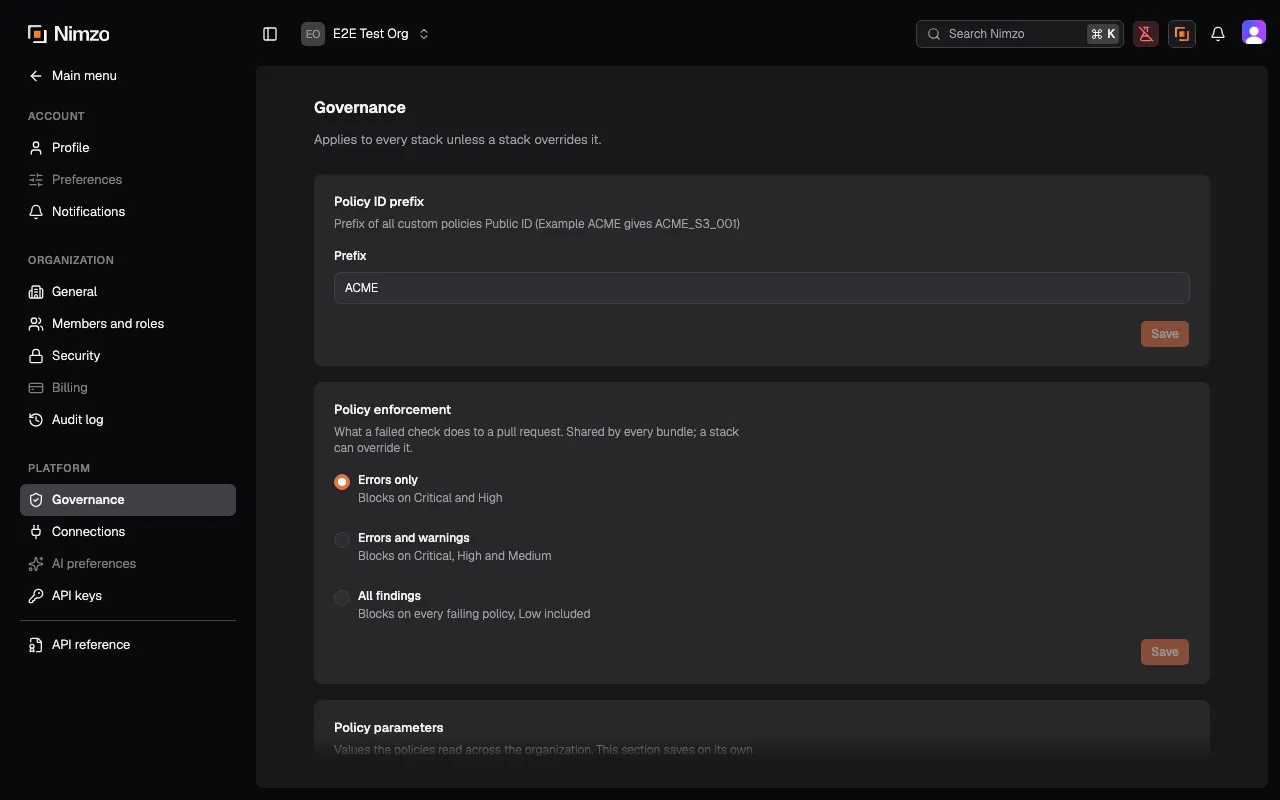
Governance settings control how policies work across your whole organization. They apply to every stack unless a stack overrides them. You find them in Settings, under Platform.
Before you start
Section titled “Before you start”- You need the Admin role to change these settings. A Member sees the saved policy prefix and a note that says to ask an Admin.
Set the policy ID prefix
Section titled “Set the policy ID prefix”The policy ID prefix is the start of the public ID of every custom policy. The prefix ACME gives IDs such as ACME_S3_001. For policies and their IDs, see Policies.
- In Settings, select Governance.
- In Policy ID prefix, type a Prefix of 2 to 10 uppercase letters or digits. Start with a letter.
- Select Save.
Nimzo shows the message Policy prefix saved. The prefix on the page is the one you saved. If the prefix is reserved, the page asks you to choose another one.
Change an existing prefix
Section titled “Change an existing prefix”A change renames every custom policy at once. Pull request checks and the audit history refer to policies by their ID. Anything that names the old IDs stops matching.
- Type the new Prefix, then select Save.
- Read the new ID example in the Change policy ID prefix dialog.
- Select Change prefix, or select Cancel to keep the old prefix.
Choose the policy enforcement mode
Section titled “Choose the policy enforcement mode”Policy enforcement sets what a failed check does to a pull request. Every policy bundle shares it. A stack can override it. For bundles, see Bundles.
- In Policy enforcement, pick one mode.
- Errors only: blocks on Critical and High.
- Errors and warnings: blocks on Critical, High and Medium.
- All findings: blocks on every failing policy, Low included.
- Select Save.
Nimzo shows the message Policy enforcement saved.
Set the policy parameters
Section titled “Set the policy parameters”Policy parameters are values that policies read across the organization. Policies that read the same key get the same value.
- In Policy parameters, edit the YAML.
- Put values under
parameters.globalto apply them to every environment. - Put values under
parameters.environments.<kind or environment name>to apply them to one environment. An environment name wins over a kind. - Select Save.
Nimzo shows the message Policy parameters saved. The page shows Last saved by with the name of the author.
If a key is not read by any policy, the page shows Saved, but some keys are not read by any policy. It lists each key and, when it can, the key you probably meant. Check the spelling of the key.
Troubleshooting
Section titled “Troubleshooting”- Changing the policy prefix needs the Admin role. Ask an Admin of this organization. Ask an Admin to make the change.
- Could not save the policy prefix. Check your connection and try again. Check your connection, then select Save again.
- Could not load the policy ID prefix. Select Retry.
- Could not load the policy enforcement. Select Retry.
- Could not load the policy parameters. Select Retry.